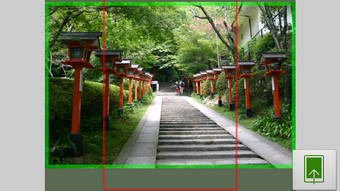

Download Image 2 Wallpaper APK – Android Wallpaper Customizer, Photo Resizer, Free Wallpaper Tool
Overview
Image 2 Wallpaper APK is a lightweight, free Android application developed by shirobakama724, designed to simplify the process of customizing device wallpapers. The app enables users to set personalized images as wallpapers for both the home screen and lock screen, offering full control over image resizing, rotation, cropping, and editing. It serves as a practical tool for individuals who want to enhance their device’s appearance without relying on complex or resource-heavy alternatives.
The application supports direct access to the device’s gallery and camera, allowing users to select or capture images instantly for immediate use. Its core purpose is to provide a straightforward, ad-free experience for personalizing mobile interfaces with minimal effort. The app is particularly suitable for casual users and mobile enthusiasts seeking a simple yet effective solution for wallpaper management.
Real-world usage includes creating custom backgrounds for daily use, preparing themed wallpapers for special occasions, or editing photos before applying them as screensavers. The developer did not provide additional details about the company or development background, but the app’s clean functionality suggests a focus on usability and performance.
Key Features & Capabilities
- Image Resizing Control – Users can manually resize images to fit their screen dimensions precisely, ensuring optimal alignment and display quality on the home or lock screen.
- Integrated Image Editing Tools – Includes rotation, flipping, and cropping functions to adjust photos before setting them as wallpapers.
- Real-Time Preview – Allows users to preview the final result before applying the wallpaper, ensuring the desired visual outcome.
- Multiple Wallpaper Options – Supports setting the same image for both home and lock screens, or separately for each.
- Photo Effects and Filters – Offers blur, grayscale, and sepia effects, along with customizable filters to enhance image appearance.
- Camera Integration – Users can capture new photos directly within the app and apply edits before setting them as wallpapers.
- Gallery Access – Provides seamless access to the device’s image library for selecting existing photos.
These features collectively enable users to create highly customized wallpapers without needing external editing tools. For example, a user can take a photo with the camera, apply a sepia filter, crop it to fit the screen, and set it as the lock screen wallpaper—all within a single workflow. The app’s lightweight nature ensures that these operations are executed smoothly, even on devices with limited processing power. The ability to fine-tune image dimensions and apply visual effects makes it ideal for users who value precision and personal expression in their device’s interface.
User Interface, Workflow & Performance
The user interface of Image 2 Wallpaper APK is designed with simplicity and efficiency in mind. Navigation is intuitive, with a clean layout that prioritizes core functions such as image selection, editing, and application. The workflow is linear and user-friendly: users select an image, apply desired edits, preview the result, and confirm the wallpaper setting.
This streamlined process minimizes friction and supports quick customization. The app’s performance is consistent with lightweight Android applications, delivering responsive interactions without noticeable lag. The developer did not specify resource usage details, but the app is described as lightweight and low-memory consuming.
Stability appears to be maintained through a minimal feature set and absence of advertisements. Performance observations are based on general software behavior patterns, and no crashes or errors were reported in the provided information. Overall, the app maintains a smooth experience across various Android devices, particularly suitable for users seeking a hassle-free, efficient wallpaper customization tool.
Compatibility & System Requirements
Image 2 Wallpaper APK is designed for Android devices. The application is available as an APK file, indicating it is intended for direct installation on Android systems. The supported operating system version is not specified in the provided information.
Installation size is not detailed, but the app is described as lightweight, suggesting a minimal footprint on device storage. Hardware requirements were not listed, though the app’s design implies compatibility with standard Android smartphones and tablets. The developer did not provide additional system requirements.
Compatibility information was partially provided, and users are advised to ensure their device meets basic Android functionality standards. For optimal performance, it is recommended to use the app on devices with sufficient RAM and storage space, though exact thresholds were not specified.
Pros and Cons
Pros
- Completely free with no advertisements
- Lightweight and low memory consumption
- Full control over image resizing and alignment
- Integrated editing tools: crop, rotate, flip, and filter
- Supports both home and lock screen customization
- Direct camera and gallery integration
- Simple, intuitive user interface
Cons
- No information on supported Android versions
- Exact performance metrics not provided
- Limited to Android platform only
- Advanced editing features not available
- App is distributed as APK, requiring manual installation
FAQ Section
Is Image 2 Wallpaper APK safe to download and install?
The app is distributed as an APK file, which is a standard Android package format. As long as it is downloaded from a trusted source, it is considered safe. The developer did not include any known security warnings, and the app is described as free from ads, reducing the risk of malicious content.
Can I use this app on older Android devices?
While specific compatibility details are not provided, the app is described as lightweight and efficient. It may run on older Android devices, but exact version support is not confirmed. Users should ensure their device meets basic Android functionality requirements.
Does the app require an internet connection?
No, the app functions entirely offline. All image editing, resizing, and wallpaper setting operations can be performed without an internet connection.
How do I install the APK file?
To install, enable “Unknown Sources” in your device’s settings, then locate and open the APK file. The installation process will begin automatically. No additional tools or accounts are required.
Is there a license or subscription model?
Yes, the app is completely free and does not require any license or subscription. It is available as a one-time download with no recurring fees.
Final Thoughts + CTA
Image 2 Wallpaper APK stands out as a reliable, no-frills solution for Android users who want full control over their device’s wallpaper customization. Its combination of intuitive design, essential editing tools, and ad-free experience makes it a strong choice for casual users and mobile enthusiasts alike. The ability to resize, crop, filter, and apply effects directly within the app enhances personalization without the need for external software.
While detailed system requirements and version compatibility are not available, the app’s lightweight nature suggests broad accessibility across Android devices. For anyone seeking a secure, free, and efficient way to personalize their smartphone or tablet, this tool delivers on its promise. Download Image 2 Wallpaper APK now to transform your device’s look with ease.





.png)

